Golf simulators have evolved from novelty entertainment into serious training tools and premium lifestyle amenities — and the technology has advanced to the point where a professionally installed home or commercial golf simulator delivers a genuinely realistic playing experience. Whether you're a serious golfer looking to practice year-round, a homeowner who wants a unique entertainment space, or a business owner looking to create a premium amenity for clients and employees, LV Pros designs and installs custom golf simulator rooms throughout Metro Atlanta.
What Makes a Great Golf Simulator Installation
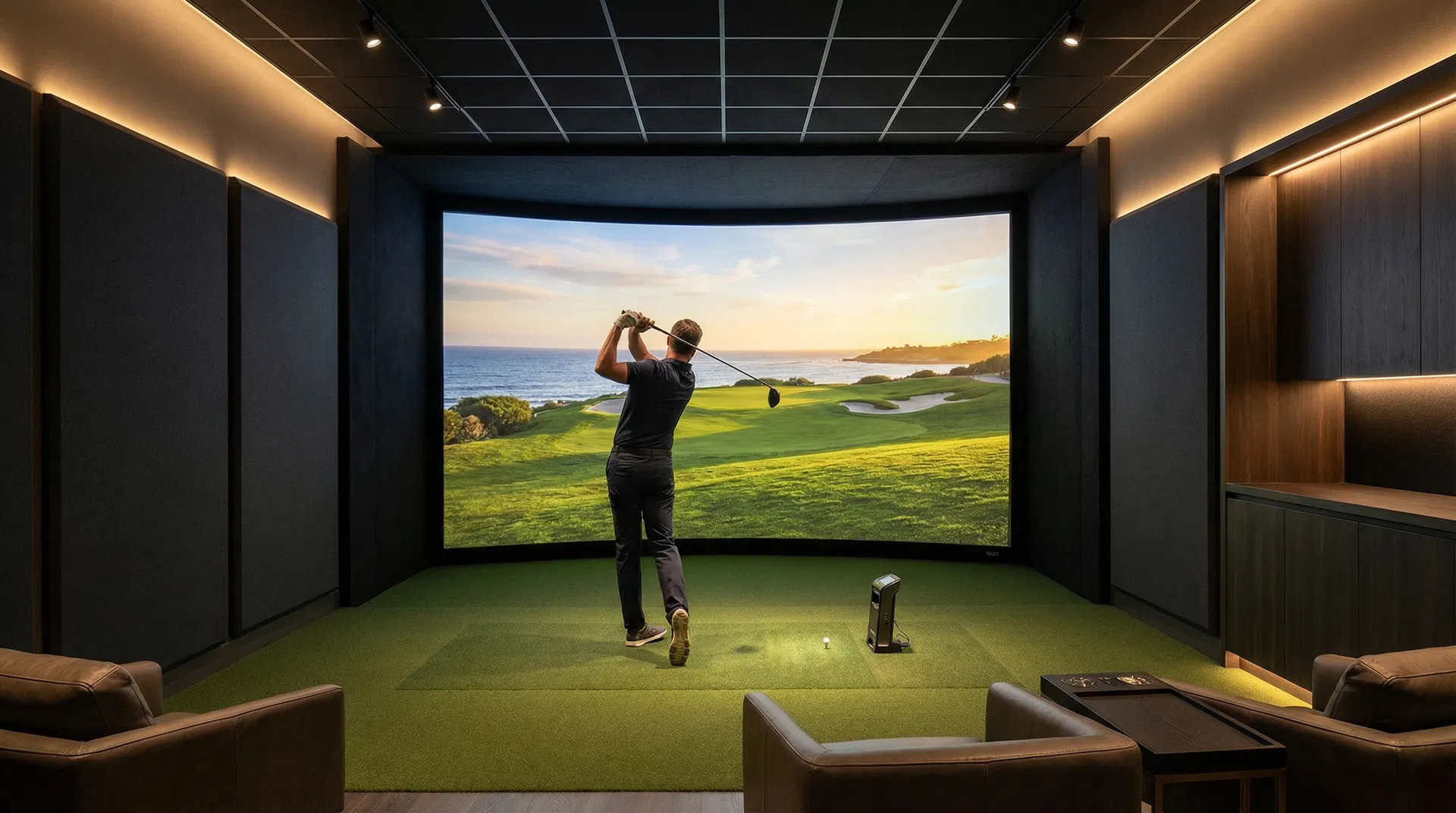
A golf simulator is more than a screen and a launch monitor — it's an integrated system where every component works together to deliver an accurate, immersive experience. The quality of your simulator experience depends on five key elements: the launch monitor, the impact screen and enclosure, the projector, the software platform, and the room design.
The launch monitor is the brain of the system — it measures ball flight data (ball speed, launch angle, spin rate, carry distance) and club data (club speed, face angle, attack angle) with high-speed cameras or radar technology. Premium launch monitors like Trackman, Foresight GC3, and Uneekor EYE XO deliver the accuracy required for serious practice and realistic simulation. The accuracy of your launch monitor directly determines the accuracy of your simulated ball flight.
The impact screen and enclosure contain the ball after impact and serve as the projection surface. A high-quality impact screen made from multi-layer woven materials absorbs ball impact without damage and provides a smooth, consistent projection surface. The enclosure frames the screen and protects the surrounding walls and ceiling from errant shots.
Room Requirements: Space, Ceiling Height, and Layout
Room dimensions are the most critical constraint in any golf simulator project, and getting them right from the start is essential. The minimum recommended dimensions for a golf simulator room are approximately 15 feet wide, 15 feet deep, and 9 feet of ceiling height — but more space is always better, particularly for ceiling height.
Ceiling height is the most commonly underestimated requirement. A full swing with a driver requires a minimum of 9 feet of clearance above the hitting position, and 10–11 feet is strongly preferred to accommodate taller golfers and full driver swings without restriction. If your room has a lower ceiling, we can design the layout to maximize usable height — but there are physical limits that can't be engineered around.
Width and depth affect the screen size and the distance from the hitting position to the screen. A wider room allows for a larger screen and a more immersive experience. Greater depth behind the hitting position provides more room for a full backswing and follow-through. We assess every room individually and design the optimal layout for the available space.
Projector Selection and Image Quality
The projector is responsible for the visual quality of your simulator experience, and selecting the right projector for your room is a technical decision that requires careful consideration of throw distance, brightness, resolution, and latency.
For golf simulators, ultra-short-throw (UST) projectors are often preferred because they can be mounted close to the screen, reducing the risk of the golfer's body casting a shadow on the image during the swing. Brightness (measured in lumens) is critical — a golf simulator room needs a projector with sufficient output to produce a clear, vibrant image even in a room that isn't completely dark.
Latency — the delay between the launch monitor capturing ball data and the projected image updating — is a critical but often overlooked specification. High latency makes the simulation feel disconnected and unrealistic. We select projectors with low input lag and configure the entire signal chain to minimize latency, resulting in a simulation that feels immediate and responsive.
Software Platforms: Where You Play
The simulation software determines where you play, how realistic the courses look, and what practice tools are available. The leading platforms each have distinct strengths, and the right choice depends on whether your primary focus is realistic course play, data-driven practice, or entertainment.
E6 Connect is widely regarded as the most visually realistic simulation platform, with meticulously rendered versions of famous courses including Pebble Beach, St. Andrews, and Augusta National. It's the platform of choice for homeowners who want the most immersive course-play experience.
Creative Golf 3D offers an extensive course library with over 250 courses and excellent multiplayer functionality, making it a popular choice for commercial installations and entertainment-focused setups. GSPro is a favorite among serious golfers for its realistic physics engine and active online community. TGC 2019 offers thousands of user-created courses and strong data integration with premium launch monitors.
Many installations support multiple software platforms, allowing you to switch between them based on your mood and goals.
Audio, Lighting, and Smart Home Integration
A premium golf simulator room isn't just about the golf technology — it's about the entire environment. Thoughtful audio, lighting, and control system integration elevates the experience from a technical installation to a genuine destination in your home.
A quality audio system with in-ceiling speakers provides ambient course sounds — birds, wind, crowd noise — that enhance immersion without requiring freestanding speakers that could interfere with the swing. A subwoofer adds the satisfying thump of a well-struck drive.
Lighting design plays a significant role in the simulator experience. Adjustable LED lighting allows you to set the right ambiance for different scenarios: bright and functional for practice sessions, dimmed for evening rounds with friends, and tuned to complement the on-screen course lighting for maximum immersion.
Integrated with a Control4 or Josh.ai smart home system, your simulator room can be automated: a single "Golf Mode" scene dims the lights, starts the simulation software, queues up your playlist, and sets the thermostat — all with one tap or voice command.
Ready to Take the Next Step?
A professionally designed golf simulator room is one of the most unique and rewarding investments you can make in your home or business. LV Pros designs and installs custom golf simulator rooms throughout Metro Atlanta — handling every aspect of the project from room assessment and equipment selection through installation, calibration, and smart home integration. Contact us today for a free consultation and let's design your perfect simulator experience.